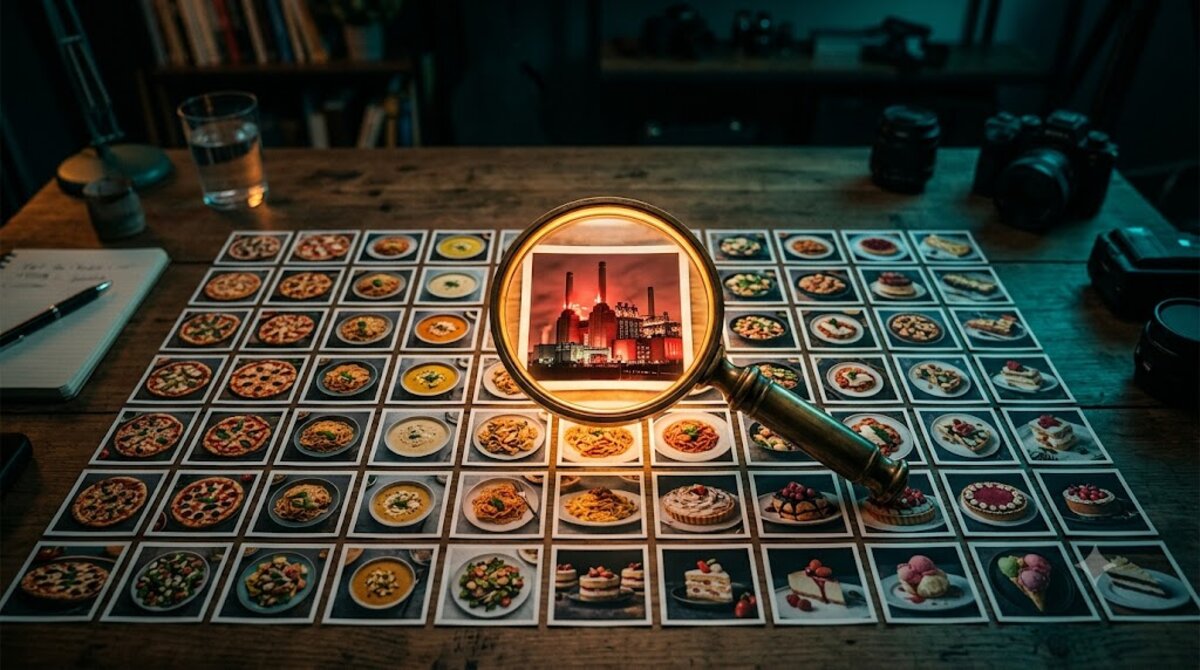
How I pointed a vision model at every image on a food encyclopedia, found out my osso buco was a power station, and turned visitors into a self-verifying photo pipeline.
The problem: 1,708 images nobody ever looked at
My travel site has a food encyclopedia — 1,708 traditional dishes across 149 countries. When it was first seeded, every dish got an image from a keyword-based stock photo service: ask for “stew”, get a stew. Any stew. Over time those URLs were swapped, cached and eventually downloaded to local storage, and the collection quietly fossilized.
Here’s the thing about keyword stock photos: nobody ever audits them. A human spot-checks ten, they look food-ish, ship it. The tail is where it gets ugly. When I finally checked properly, the page for osso buco — the Milanese braised veal shank — was illustrated with a photo of Battersea Power Station with a red double-decker bus in front of it. Tiramisu was an airline meal tray. Lasagne was a restaurant patio at night. Not wrong-ish. Wrong like a different universe.
Manually reviewing 1,708 images would take days and I’d have to redo it every time content changes. This is exactly the shape of problem vision LLMs are now good enough and cheap enough to own.
Step 1: discover what your model can actually see
The fleet of sites I run already talks to MiniMax for text generation, so I tried their vision models first. Surprise number one: the dedicated vision model names (MiniMax-VL-01, MiniMax-VL) don’t exist on the API endpoint I use. Surprise number two: the plain MiniMax-M3 text model accepts image_url content parts and reads images just fine — same key, same endpoint, no extra setup.
The lesson generalizes: before you add a new provider for a “vision” feature, throw an image at the model you already pay for. Multimodality has been quietly folded into flagship text models across the industry, and the docs lag reality.
One provider-specific gotcha I already knew from a previous integration: MiniMax-M3 puts its chain-of-thought inline in the response as <think>...</think> rather than in a separate field. If you json_decode the raw content, you fail on 100% of real responses — while every unit test with mocked responses passes. Strip it first:
$content = preg_replace('/<think>.*?<\/think>/s', '', $content);Step 2: an audit command, not an audit script
The classifier is a Laravel artisan command, because throwaway scripts have a way of becoming permanent infrastructure with no home. Three columns on the foods table carry the state:
image_status       -- 'ok' | 'mismatch'
image_check_note   -- confidence + what the image actually shows
image_checked_at   -- timestamp, doubles as the resume cursor
Each food’s image goes to the model with the dish name, origin country, category and aliases, and one strict instruction — reply with JSON only:
Dish: Osso Buco
Country of origin: Italy
Category: Meat & Grills
Look at the attached image. Decide if it plausibly depicts this
dish (or a close regional variant). A photo of a clearly different
food, a generic stock photo, scenery, objects, or people is NOT
a match.
Reply with ONLY a JSON object:
{"match": true or false, "confidence": 0.0-1.0,
 "image_shows": "what the image actually shows"}
The design decision that matters most: a row only gets image_checked_at on a successful verdict. Errors leave it null. That single choice makes the command resumable after any crash, rate limit or deploy — rerun it and it continues where it stopped. No job queue, no checkpoint file.
Storing image_shows — what the model saw instead — turned out to be the sleeper feature. “mismatch” tells you the image is wrong; “a view of Battersea Power Station with a red double-decker bus” tells you how wrong, and gives you an instant QA sample to eyeball for false positives.
Step 3: fail visibly, not silently
What should a page do when its image flunks the audit? Hiding the image and showing nothing is honest but sad. Keeping the wrong image is worse — every mismatched photo actively teaches visitors your data can’t be trusted.
I went with: hide the mismatched image everywhere it appears — listing cards, the detail-page hero, og:image, the video poster, even the JSON-LD structured data (you really don’t want search engines indexing a power station as veal shank) — and let the layout fall back to the category-emoji placeholder that already existed. Then, in the hole where the image was, make it the visitor’s problem in the nicest possible way:
📷 We don’t have a verified photo of Osso Buco yet. Have you tried this dish? Upload your photo — it’s checked automatically and goes live right away.
Step 4: crowdsourcing with a bouncer
Open, unauthenticated photo uploads are usually a moderation nightmare, which is why most small sites never ship them. But I already had a model that can look at a picture of food and tell me what it is. The same service class that audits catalogue images moderates submissions — with a stricter prompt: the photo must actually show the dish, be a real photograph (no memes, screenshots or AI-render soup), be safe for work, and carry no watermarks.
The flow: upload lands in a temp public path → the model looks at it → pass means it instantly becomes the page’s featured image and the status flips to ok; fail means it’s deleted and the visitor sees the reason. Plus the boring-but-essential armor: rate limiting per IP, file type and size validation, minimum dimensions.
I tested the rejection path by uploading a photo of spaghetti carbonara to the lasagne page. The response:
Photo not accepted: Long pasta in a creamy white sauce with bacon pieces and black pepper — not Lasagne alla Bolognese, which requires layered flat pasta sheets with a meat ragù and typically béchamel/tomato sauce.
That’s a better rejection notice than most human moderators would write. Then I uploaded a genuine lasagne photo: verified, published, live on the page — total elapsed time about eight seconds, zero humans in the loop.
Results and what I’d tell you to steal
The full audit is grinding through all 1,708 dishes as I write this, at roughly 7–10 seconds per image, for a total API cost that rounds to pocket change. The early sample confirms the hunch that keyword stock photos age like milk: a large share of the catalogue is getting flagged, each with a written explanation of what the image actually shows.
If you run any site with a large image inventory you didn’t hand-pick, the recipe is short:
Audit with the model you already have. Test whether your text model accepts images before adding a vision-specific provider. Make verdicts structured and resumable. JSON-only replies, a status column, and a checked-at timestamp that only sets on success. Store what the model saw, not just pass/fail — it’s your false-positive QA and your rejection UX in one field. Close the loop with users. A verified-upload flow turns every flagged image into an invitation, and the same model that found the problem guards the fix.
The osso buco page, for now, shows a modest 🍖 emoji. It’s not a photo of braised veal shank — but at least it’s not a power station.